- Each issue now links to the free tool that fixes it: meta tags, Open Graph and title or description problems go to the Meta Tag Generator, JSON-LD to the Structured Data Generator, favicons and the web app manifest to the Favicon Generator, plus the robots.txt, llms.txt and Sitemap tools
- The Meta Tag Generator, Sitemap Analyzer, Favicon Checker, AI Crawler Checker, What AI Sees and HTML to Markdown offer "Use your site from your last SEO analysis", so you do not retype the address
- The address is kept only in this browser tab for two hours and is never put into a link
SEO Analyzer
Audit Your Site's SEO & Performance
#1 tool for analyzing any URL for SEO issues, deprecated meta tags, and head tag ordering for optimal performance. Now with an AI search readiness check and platform-aware fixes. Free, no sign-up, nothing stored.
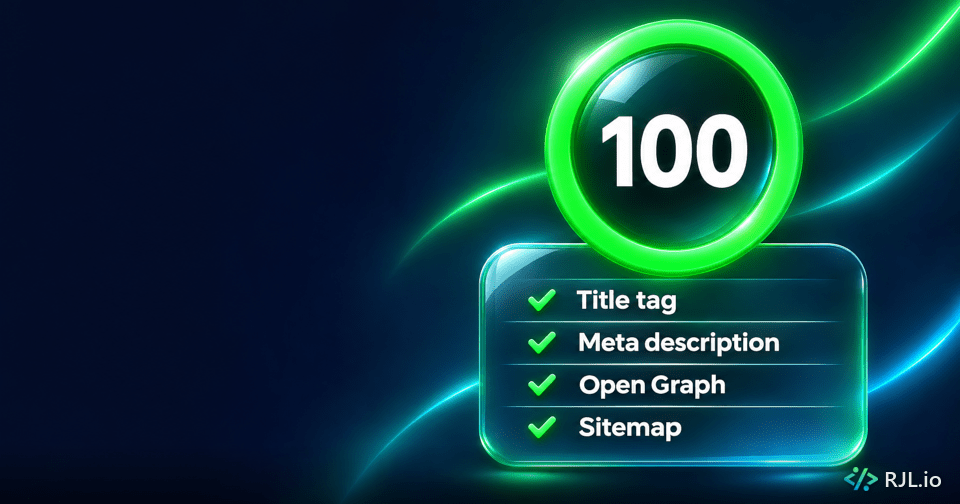
SEO Analyzer Tool
Analyze Website
Validate standalone display, scope, orientation, share_target, and dual-screenshot requirements for installable PWAs
Press Enter to analyze
What We Analyze
- Meta tags (title, description, OG, Twitter)
- Head tag order for performance
- Deprecated tags (keywords, generator, etc.)
- Site resources (sitemap, robots, manifest)
- Favicons and PWA readiness
- Manifest: id, description, screenshots, scope
- Platform detection for 22 CMSs, site builders, stores and frameworks (WordPress, Shopify, Wix, Squarespace, Webflow, Next.js and more)
See how this page looks when shared
Open it in the Meta Tag Generator for live previews on Google, Facebook, LinkedIn, X, Slack, Discord and more - then fix the tags and send the preview link to your team.
Direct Link
Share analysis with ?url=domain.com
Site Resources
AI Readiness
For information only. This does not change your SEO score. What these checks mean
Favicon Analysis Generate Favicons
Web Manifest Generate 2026 Manifest
Head Tag Order Analysis Why Order Matters
Order Issues Found Why Order Matters
Move these tags earlier in your <head> for better performance.
Analyzing website...
Initializing analysis...
Fetching webpage
Parsing meta tags
Checking site resources
Running SEO validation
Crawling Site
0 / 0 pages 0%
Currently analyzing:
0s
- (JS heap)
0 errors
Enter a URL to analyze
We'll check meta tags, head order, and SEO best practices
Error analyzing URL
Site-Wide SEO Analysis
0
Pages Analyzed
0
Critical Issues
0
Warnings
0
Suggestions
Elapsed: - Avg: -/page Memory: - (JS heap used/allocated) Failed: 0 Rate limited: 0 retries, slowed to 1 concurrent, finished at 1
AI Assistant Prompt
Copy and paste to ChatGPT, Claude, etc.Validation Results
Why Order MattersCopy this prompt and paste it into your AI assistant (Claude, ChatGPT, etc.) to get help fixing these SEO issues.
Complete reference of all SEO validation rules used by this analyzer.
Download a branded, human-readable PDF summarizing every issue, warning, and suggestion - what's wrong, where, and how to fix it. Hand to a developer or stakeholder.
What's in the PDF?
- Cover page with score, grade, URL, and generation date
- Critical issues, warnings, and suggestions - each with the exact deduction value
- Successes (what's already working)
Download Fixed Code
Download a ZIP file with your corrected files. We preserve your existing code and only make targeted fixes - removing deprecated tags and adding missing essentials. An original/ folder is included for easy comparison.
What's Included
original/ folder with your current files for easy diff comparison
Important: Review Before Using
These files are generated automatically and may contain errors. Always review and test the generated code before deploying to your live site. Compare with your existing files and verify all changes are correct.
| Tag | Value | Status |
|---|
SEO in the age of AI search
Search is turning into answers. Here is what search engines and AI tools actually use today, what is optional, and where the AI Readiness card in this analyzer fits.
What engines actually use
- Google AI Overviews and AI Mode need no special optimization. Your page must be indexed and eligible to show a snippet. Google says llms.txt, Markdown copies and special schema are not needed. Snippet controls (
nosnippet,max-snippet,data-nosnippet) limit what text can be shown. Google's AI optimization guide - Crawler rules are split by purpose. OpenAI uses
OAI-SearchBotfor ChatGPT search,GPTBotfor training andChatGPT-Userwhen a person asks. Anthropic usesClaude-SearchBot,ClaudeBotandClaude-Userthe same way, and says blocking the search and user bots may reduce your visibility. Perplexity usesPerplexityBotfor its search index andPerplexity-Userfor user requests.Google-ExtendedandApplebot-Extendedare training opt-outs that do not affect search. Blocking training is a choice. Blocking search is the mistake. OpenAI bots | Perplexity bots - Crawlers that skip JavaScript see only your raw HTML. If your text is built in the browser, those crawlers may see an empty page. Vercel and MERJ crawler study (Dec 2024)
- Bing and Copilot reward freshness and show citations. Bing Webmaster Tools has an AI Performance report that counts where your pages are cited in Copilot and Bing AI answers. IndexNow plus an accurate sitemap
lastmodhelps new and changed pages get re-read sooner.
Optional, with limited support
- llms.txt is a proposal (version 2 appeared in August 2026), not a standard. Ahrefs found that 97% of llms.txt files received no AI requests. Cheap to add, but do not expect results.
- Usage signals in robots.txt (Cloudflare
Content-Signal,License:from RSL, andContent-Usage:from the IETF AIPREF work) are voluntary and only some crawlers read them.
Where SEO is going
Classic SEO is the foundation that AI answers are built on. An AI answer can only cite a page that was crawled, indexed and readable. What matters more now: being crawlable, serving real text in the HTML, keeping dates fresh, saying clearly who you are with structured data, and earning citations. Measure those citations in Bing Webmaster Tools, and keep fixing the basics here.
AI & LLM Readiness tools
Eight free tools: check which AI bots can read you with the AI Crawler Checker, see your page as a no-JavaScript crawler in What AI Sees, build JSON-LD with the Structured Data Generator, make Markdown copies with HTML to Markdown, ping Bing and Copilot with the IndexNow Key Generator, and write your llms.txt and robots.txt. All in your browser.
Jump straight in: llms.txt Generator | robots.txt Generator
What this analyzer checks that typical free SEO checkers don't
Most AI features in other SEO tools are paid or need a sign-up, and focus on tracking brand mentions. Free checkers without a sign-up rarely go further than this.
| This analyzer | Typical free checker |
|---|---|
| Splits AI crawler rules by purpose: search, user fetch and training | Rarely separates them |
| Checks whether your content is visible without JavaScript | Rarely checks |
| Detects Content-Signal, RSL and AIPREF lines, and snippet controls | Rarely detects them |
| Fix steps for your platform, plus copy-ready prompts for your AI assistant | None found with both |
| Free, no sign-up, no daily limit, nothing stored | Often a sign-up, a paid tier, or a cap (one free checker allows 3 checks a day) |
Why Head Tag Order Matters for Performance
The order of tags in your <head> directly impacts how fast browsers render your page. Place critical tags first for optimal performance.
Strongly Recommended Order
These are million dollar performance tips. Buy us a Coffee for these!
<!DOCTYPE html>
<html lang="en">
    <head>

    <!-- 1. Charset & Viewport (The Physics) -->
    <meta charset="UTF-8">
    <meta name="viewport" content="width=device-width, initial-scale=1.0">

    <!-- 2. Title & Description (The Hook) -->
    <title>Page Title</title>
    <meta name="description" content="Your description here">

    <!-- 3. Canonical (The Source of Truth) -->
    <link rel="canonical" href="https://example.com/page">

    <!-- 4. Robots & Sitemap (The Map) -->
    <meta name="robots" content="index, follow">
    <link rel="sitemap" type="application/xml" href="/sitemap.xml">

    <!-- 5. Social Open Graph (The Share) -->
    <meta property="og:title" content="Page Title">
    <meta property="og:image" content="https://example.com/image.jpg">

    <!-- 6. Icons & Theme (The Look) -->
    <link rel="icon" type="image/svg+xml" href="/favicon.svg">
    <meta name="theme-color" content="#ffffff">

    <!-- 7. Preconnect (The Handshake) -->
    <link rel="preconnect" href="https://www.google-analytics.com">

    <!-- 8. Inline Analytics (The Blobs) -->
    <script>/* Clarity / PostHog / GTM Setup Blob */</script>
    <script async src="https://www.googletagmanager.com/gtag/js"></script>

    <!-- 9. Visuals (Stability First) -->
    <!-- Critical Layout Locks (Prevents Jumps) -->
    <!-- Inline styles strictly for reserving container space to prevent Cumulative Layout Shift (CLS) during load -->
    <style>
        #home.container-xl { max-width: 1280px; }
        @media (min-width: 992px) { .home-banner h1 { white-space: nowrap; } }
    </style>

    <!-- 10. Framework (The Foundation) -->
    <!-- Bootstrap Core: Loads the structural grid and utility classes. 'fetchpriority=high'-->
    <!-- signals the browser to prioritize this resource to paint the layout structure immediately -->
    <link rel="stylesheet" href="/css/bootstrap.css" fetchpriority="high">

    <!-- 11. Custom (The Identity) -->
    <!-- Site-Specific Overrides: Loads your branding, colors, and tailwind/custom rules.-->
    <!-- Placed *after* the framework to ensure your CSS rules correctly overwrite defaults via the cascade -->
    <link rel="stylesheet" href="/styles.css">

    <!-- 12. Logic (The Brains) -->
    <!-- 12a. Libraries (Dependencies First) -->
    <script src="/js/jquery-3.5.1.min.js" defer></script>
    <script src="/js/bootstrap.bundle.min.js" defer></script>

    <!-- 12b. Plugins (Visuals & Features) -->
    <script src="/js/nswf.min.js" defer></script>
    <script src="/js/headshot.js" defer></script>

    <!-- 12c. Execution (Your Custom Code) -->
    <script src="/js/theme.js" defer></script>
    <script src="/js/main.js" defer></script>

    <!-- 12d. Inline Config (Safe Wrapper) -->
    <script>
      // We wrap this in an event listener to ensure headshot.js (above) is loaded before this runs
      document.addEventListener('DOMContentLoaded', function() {
          if (typeof headshot !== 'undefined') {
              headshot.initializeHeadShot("headshotThumb", {
                  allowClickToChange: true,
                  borderRadius: true,
                  glowAlways: true,
                  glowColor: "#5439F8"
              });
          }
      });
    </script>

    <!-- 13. Structured Data (The Details) -->
    <script type="application/ld+json">{ "@context": "https://schema.org" }</script>
</head>1. Charset & Viewport
Must be first. Defines how the browser reads text (Charset) and scales the window (Viewport). If these aren't first, mobile browsers delay rendering to guess the zoom level.
2. Title & Description
Search crawlers parse top-down. You want your identity established immediately so the browser knows what to display in the tab and history.
3. Canonical URL
Crucial for preventing "duplicate content" SEO penalties. It tells Google: "Even if this page was loaded via a weird link, THIS is the official URL."
4. Robots & Sitemap
Explicitly telling bots to "index, follow" is safer than assuming they will. The sitemap link here ensures bots find your deep content even if they miss robots.txt.
5. Social Open Graph
Crucial for link previews. Slack and LinkedIn bots give up quickly; placing these high ensures your image and title appear correctly when shared.
6. Icons & Theme
Defines the browser tab icon and mobile address bar color. Placing these early prevents the "default icon" flicker, but they are non-blocking.
7. Preconnect
Warms up connections to external servers (like Google/Clarity) while your HTML is still parsing. Saves ~300ms of latency when the scripts below finally run.
8. Inline Analytics
The "Blob" scripts go here. They initialize the data layer instantly and trigger the file download before CSS blocks the page, ensuring parallel loading.
9. Visuals (Stability First)
This is purely for CLS (Cumulative Layout Shift). We use inline styles to reserve space for the main container immediately so the page doesn't "jump" when CSS loads.
10. Framework (The Foundation)
Bootstrap/Tailwind core goes here. We use fetchpriority="high" because the browser must paint this layout before anything else. It is the "skeleton" of the page.
11. Custom (The Identity)
Your styles.css must come after the framework. This protects the "Cascade" (the C in CSS), allowing your custom branding to override framework defaults without using !important.
12a. Libraries (Dependencies)
Order Matters: Bootstrap 4/5 requires jQuery to run. By placing jQuery first and using defer on both, we guarantee jQuery loads before Bootstrap executes, preventing console errors.
12b. Plugins (Features)
We removed your "Lazy Load" hack. Using defer allows the browser to download these files in parallel with the HTML (faster) but waits to run them until the page is ready (safer).
12c. Execution (Custom)
Your custom logic (theme.js, main.js) comes last. This ensures that when your code tries to use jQuery or a plugin, those libraries are already loaded and waiting.
12d. Inline Config
Since we kept the Headshot config in the HTML, we wrapped it in DOMContentLoaded. This tells the code: "Wait until all deferred scripts (above) are finished before trying to run this."
13. Structured Data
Pure JSON-LD data for Google. It has zero visual impact. Placing it last ensures it doesn't delay the browser from fetching visual assets like CSS or images.
Common Use Cases
SEO Audits
Comprehensive analysis of any page's meta tags, structured data, and SEO best practices.
Competitor Analysis
See how competitors structure their meta tags and what SEO techniques they use.
Pre-Launch Checks
Verify all SEO requirements are met before launching a new website or page.
Performance Optimization
Fix head tag ordering to improve page load performance and Core Web Vitals.
Deprecated Tag Cleanup
Find and remove deprecated meta tags like keywords that can hurt your SEO.
Team Reviews
Share analysis results with your team using direct links with the URL parameter.
WordPress SEO Audit
Get WordPress-specific recommendations with Yoast, Rank Math, and AIOSEO plugin detection.
E-Commerce SEO Check
Audit Shopify, WooCommerce, and Squarespace stores with platform-aware fix instructions.
Platform-Aware Analysis
Generic SEO Tools
- "Add a meta description to your HTML head section"
- "Remove the generator meta tag from your code"
- "Create a robots.txt file in your web root"
- No guidance on WHERE to make changes in your CMS
RJL.io Platform-Aware Analysis
- "In the Yoast SEO panel, click SEO tab and edit Meta description"
- "Add to functions.php: remove_action('wp_head', 'wp_generator')"
- "Shopify generates robots.txt automatically via robots.txt.liquid"
- Exact steps for your specific CMS and SEO plugin
Supported Platforms
WordPress
Yoast, Rank Math, AIOSEO, themes
Shopify
Themes, Liquid templates, apps
Wix
Wix Editor, SEO Wiz, custom code
Squarespace
Page settings, Code Injection
Every platform we detect
The analyzer recognizes the platform from the page itself and writes each fix for it: the admin menu to open, the setting to change, or the file in your code. For frameworks and hosting, the steps say where the head tags and root files live, such as the Next.js Metadata API, a SvelteKit layout or a Cloudflare Pages build folder.
| Platform | Type | Tech stack |
|---|---|---|
 Carrd | Site builder | Hosted (SaaS) |
 Duda | Site builder | Hosted (SaaS) |
 Framer | Site builder | Hosted (SaaS), React |
 GoDaddy Website Builder | Site builder | Hosted (SaaS) |
 Google Sites | Site builder | Hosted (SaaS) |
 Hostinger Website Builder | Site builder | Hosted (SaaS) |
 Jimdo | Site builder | Hosted (SaaS) |
 SITE123 | Site builder | Hosted (SaaS) |
 Squarespace | Site builder | Hosted (SaaS) |
 Strikingly | Site builder | Hosted (SaaS) |
 Tilda | Site builder | Hosted (SaaS) |
 Webflow | Site builder | Hosted (SaaS) |
 Webnode | Site builder | Hosted (SaaS) |
 Weebly / Square Online | Site builder | Hosted (SaaS) |
 Wix | Site builder | Hosted (SaaS) |
 Zoho Sites | Site builder | Hosted (SaaS) |
 Ghost | Publishing | Node.js |
 Medium | Publishing | Hosted (SaaS) |
 Notion Sites | Publishing | Hosted (SaaS) |
 Substack | Publishing | Hosted (SaaS) |
 Kajabi | Courses | Hosted (SaaS) |
 Teachable | Courses | Hosted (SaaS) |
| Platform | Type | Tech stack |
|---|---|---|
 1C-Bitrix | CMS | PHP |
 Adobe Experience Manager | CMS | Java (Adobe) |
 Concrete CMS | CMS | PHP |
 Craft CMS | CMS | PHP |
 Drupal | CMS | PHP |
 HubSpot CMS | CMS | Hosted (SaaS), HubL |
 Joomla | CMS | PHP |
 Kentico Xperience | CMS | .NET |
 Sitecore | CMS | .NET |
 TYPO3 | CMS | PHP |
 WordPress | CMS | PHP |
 BigCommerce | Online store | Hosted (SaaS), Stencil |
 Ecwid | Online store | Hosted (SaaS) |
 Magento / Adobe Commerce | Online store | PHP |
 OpenCart | Online store | PHP |
 PrestaShop | Online store | PHP (Symfony) |
 Salesforce Commerce Cloud | Online store | Java (Salesforce) |
 Shopify | Online store | Hosted (SaaS), Liquid |
 Shopware | Online store | PHP (Symfony) |
 Tiendanube / Nuvemshop | Online store | Hosted (SaaS) |
 WooCommerce | Online store | PHP (WordPress add-on) |
| Platform | Type | Tech stack |
|---|---|---|
 Analog | Framework | Angular, Node.js |
 Angular | Framework | Angular, Node.js |
 Astro | Framework | Node.js |
 Eleventy | Framework | Node.js |
 Gatsby | Framework | React, Node.js |
 Hexo | Framework | Node.js |
 Hugo | Framework | Go |
 Jekyll | Framework | Ruby |
 Next.js | Framework | React, Node.js |
 Nuxt | Framework | Vue, Node.js |
 Qwik | Framework | Qwik, Node.js |
 React Router / Remix | Framework | React, Node.js |
 SvelteKit | Framework | Svelte, Node.js |
 Vue.js | Framework | Vue |
 Zola | Framework | Rust |
 Docusaurus | Docs | React, Node.js |
 GitBook | Docs | Hosted (SaaS) |
 Mintlify | Docs | Hosted (SaaS) |
 MkDocs | Docs | Python |
 Quarto | Docs | Pandoc (Quarto CLI) |
 Sphinx | Docs | Python |
 VitePress | Docs | Vue, Node.js |
 Cloudflare Pages | Hosting | Static hosting |
 GitHub Pages | Hosting | Static hosting |
 Netlify | Hosting | Static hosting |
 Vercel | Hosting | Static hosting |
The Plain-English Guide to SEO Head Tags
Everything a crawler or a share preview reads about your page lives in the head. This guide explains what each tag does, the limits that matter, and the mistakes that cost the most.
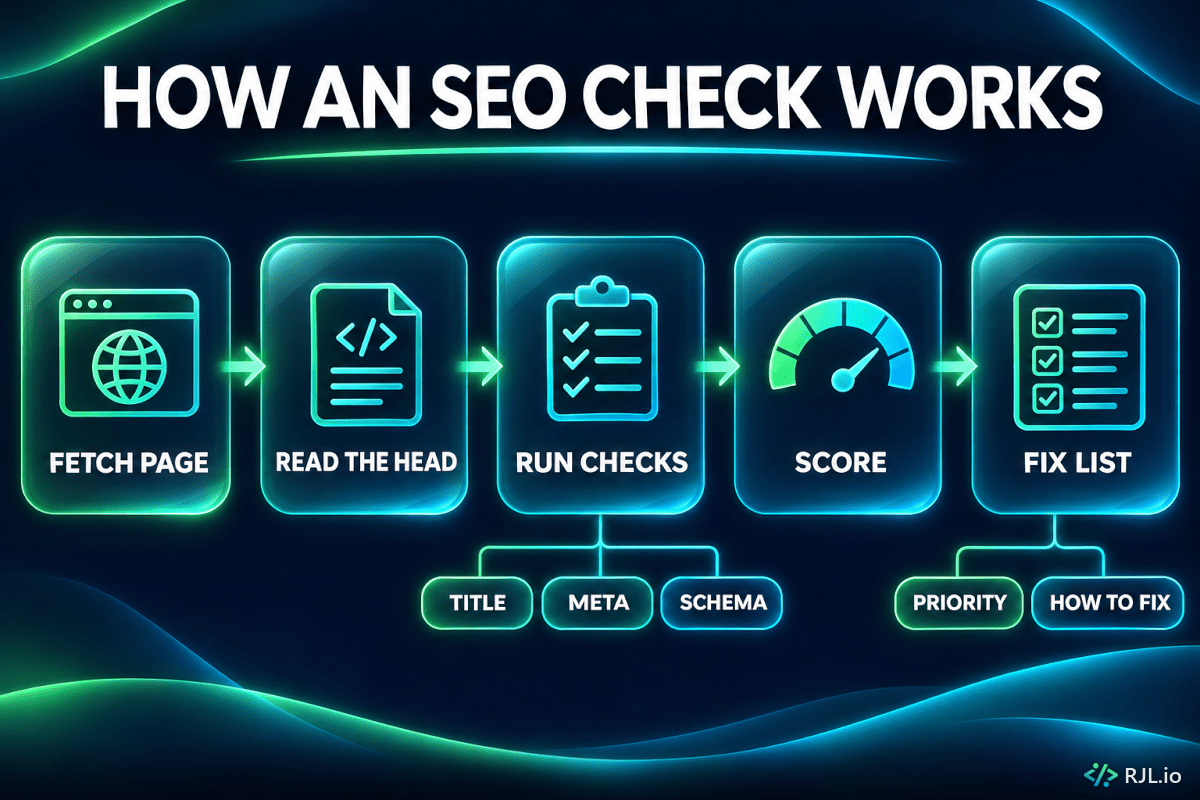
How an SEO Check Works
An on-page SEO check does five things, in order. Knowing the steps tells you where a problem comes from.
- Fetch the page. The HTML is requested the way a crawler would see it, before any browser scripts run.
- Read the head. Title, description, canonical, robots, Open Graph, icons and JSON-LD are pulled out and put in order.
- Run the checks. Each tag is tested for presence, length, duplicates, valid values and deprecated syntax.
- Score. Every finding is weighted, so a missing title costs more than a slightly short description.
- Build the fix list. Problems are ranked by priority, each with the change to make.
If the page you test builds its tags with JavaScript, the raw HTML may be missing tags a browser shows. Search engines that do not run scripts see the same gap, so fix it at the source.
Length Limits and What They Mean
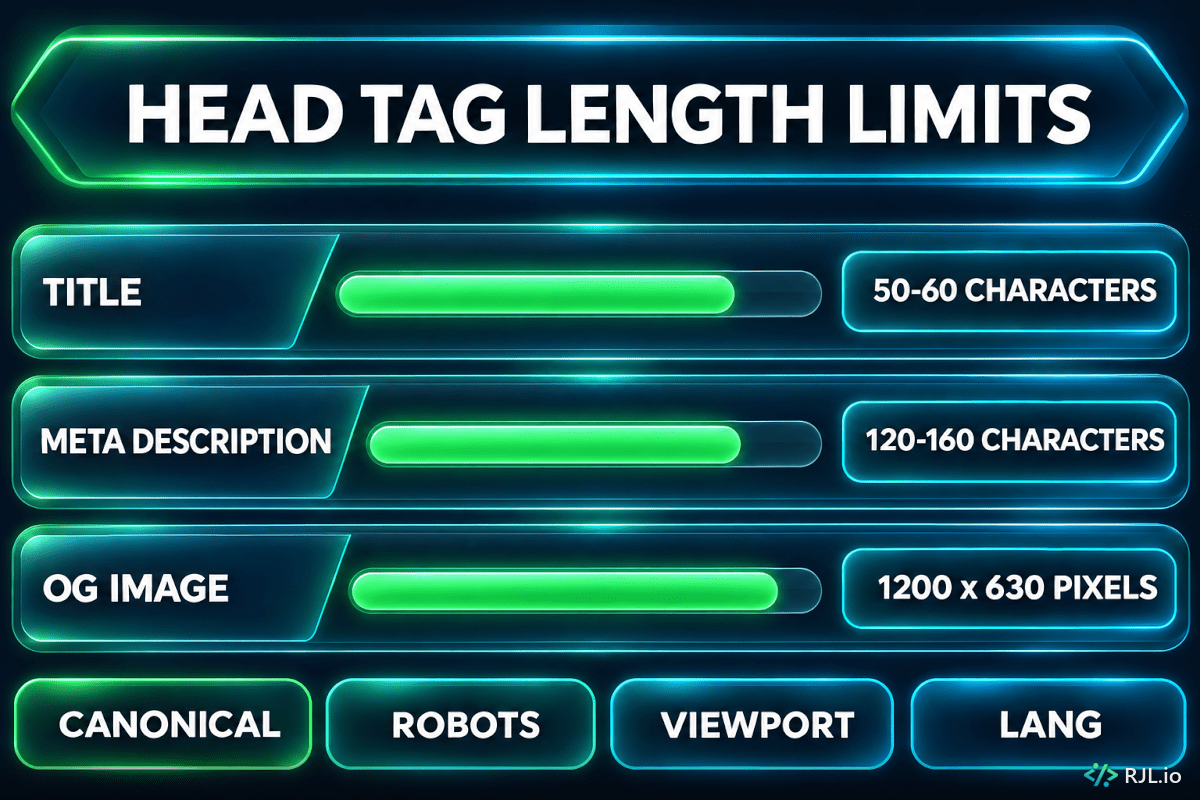
Search engines do not publish a hard character limit. They cut results by pixel width, so these are practical targets that avoid truncation on most screens.
| Element | Target | Why |
|---|---|---|
| <title> | About 50 to 60 characters | Longer titles are cut off with an ellipsis in results; put the key words first. |
| meta description | About 120 to 160 characters | Shown as the snippet when it matches the query; Google may write its own if yours does not. |
| og:title | Under about 60 characters | Share cards crop long headlines. |
| og:image | 1200 x 630 pixels (1.91:1) | The size Facebook and LinkedIn use for a full-width card; other ratios get cropped. |
| URL | Short, lowercase, hyphenated | Readable URLs are easier to share and to match against the title. |
A description is not a ranking factor on its own. It earns clicks, and clicks are what you are writing it for. Give each page its own title and description; duplicates tell search engines the pages are the same.
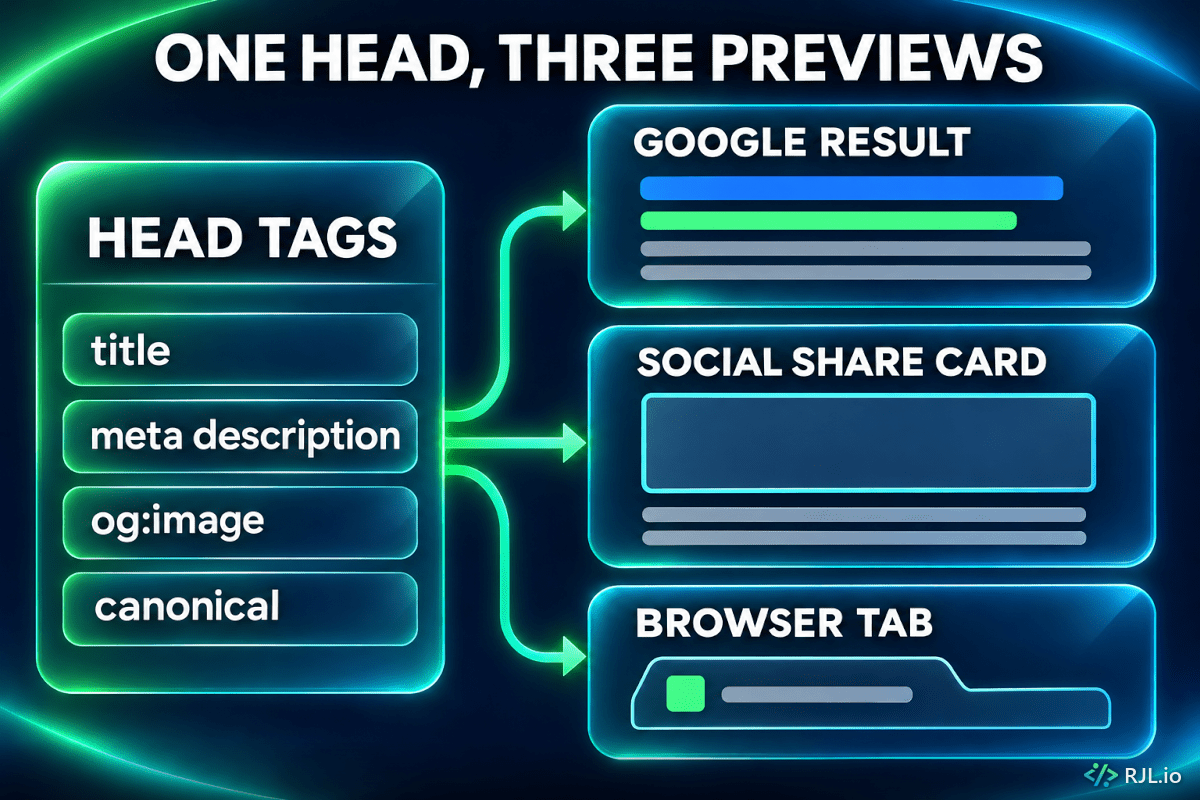
One Head, Three Previews
The same handful of tags decides how your page looks in three places people actually see it.
- Search result. The title becomes the blue link and the description the snippet. The canonical tells the engine which URL to show when several point at the same content.
- Social share card. Open Graph tags (
og:title,og:description,og:image) build the card in chat apps and social feeds. Without them each platform guesses, often badly. - Browser tab. The title is the tab label and the favicon is the tab icon. The page title is also what a bookmark is saved as.
Want to see the cards before you publish? Build them in the Meta Tag Generator, then run the finished page through the analyzer above.
Tag Reference: Canonical, Robots, Open Graph, JSON-LD
Canonical and robots
<link rel="canonical" href="https://example.com/guide/">
<meta name="robots" content="index, follow">
<meta name="robots" content="noindex, follow">
<meta name="robots" content="max-image-preview:large">- Use one canonical per page, as an absolute URL, pointing at the exact address you want indexed. A self-referencing canonical is normal and safe.
index, followis the default, so the tag is optional. Usenoindexfor thin or private pages you still want crawled for links.max-image-preview:largeallows large image previews in results;nosnippetandmax-snippet:Nlimit the text shown.- A page blocked in
robots.txtcannot be crawled, so anoindexon it is never seen. Pick one approach.
Open Graph
<meta property="og:type" content="website">
<meta property="og:title" content="Page title">
<meta property="og:description" content="One sentence.">
<meta property="og:url" content="https://example.com/guide/">
<meta property="og:image" content="https://example.com/og.png">
<meta property="og:image:alt" content="What the image shows">- Use
propertyfor Open Graph tags andnamefor standard meta tags. - Image and page URLs must be absolute (full
https://addresses). - Keep
og:urlidentical to the canonical. - Use
og:typeofarticlefor posts andwebsitefor everything else.
JSON-LD structured data
<script type="application/ld+json">
{
  "@context": "https://schema.org",
  "@type": "Organization",
  "name": "Example Co",
  "url": "https://example.com/",
  "logo": "https://example.com/logo.png"
}
</script>| Type | Use it for |
|---|---|
| Organization | Who you are: name, logo, official profile links |
| WebSite | The site as a whole, on the home page |
| BreadcrumbList | The page's path, shown as a breadcrumb trail in results |
| Article | Posts and guides: headline, author, dates, image |
| Product | Items for sale: name, image, price and availability |
| FAQPage | Question and answer content. Google now shows FAQ rich results only for a few authoritative sites, but the markup remains valid. |
The JSON must be valid (double quotes, no trailing commas) and describe content that is visible on the page. Check your markup with the JSON Tools if a block refuses to parse.
Site Files: Sitemap, robots.txt, Favicons, llms.txt
| File | Where | What it does | Rules of thumb |
|---|---|---|---|
| sitemap.xml | /sitemap.xml | Lists the pages you want indexed | Up to 50,000 URLs or 50 MB uncompressed per file; use a sitemap index beyond that. List only canonical, indexable URLs. Check yours with the Sitemap Analyzer. |
| robots.txt | /robots.txt | Tells crawlers which paths they may fetch | Controls crawling, not indexing. Add a Sitemap: https://example.com/sitemap.xml line. A stray Disallow: / hides the whole site. |
| Favicons | /favicon.ico and head links | Tab, bookmark and home-screen icons | Ship favicon.ico, a 32x32 PNG, a 180x180 apple-touch-icon and 192x192 and 512x512 icons in the web manifest. Build the set with the Favicon Generator. |
| llms.txt | /llms.txt | A Markdown summary of the site for AI assistants | A community proposal, not a formal standard: a title, a one-line summary and a list of links to your key pages. Optional, and no search engine promises to use it. |
Common Mistakes and How to Fix Them
| Mistake | Why it hurts | Fix |
|---|---|---|
| Same title on every page | Pages look like duplicates in results | Give each page a unique, specific title |
| Canonical points to a different page, or to a redirect | The page you care about may be dropped from the index | Point the canonical at the page itself, on its final URL |
Relative og:image URL | Share cards show no image | Use the full https:// address |
Staging noindex left on after launch | The live site drops out of search | Remove it, then request a re-crawl |
| Charset or viewport placed late in the head | The browser may re-parse the page or delay mobile layout | Put charset first and viewport right after it |
| Two canonicals or two descriptions | Conflicting signals; engines may ignore both | Keep exactly one of each |
| JSON-LD that does not match the page | Markup can be ignored or flagged | Mark up only what visitors can see |
| Sitemap lists redirected or noindex URLs | Wastes crawl attention and sends mixed signals | List only live, canonical, indexable pages |
Keep the Checklist Handy
The tags, limits and site files from this guide on one printable page: title and description lengths, canonical, robots, Open Graph, JSON-LD, sitemap, favicons and llms.txt.
Download the SEO Analyzer cheat sheet (PDF)Need to generate new meta tags?
Use our Meta Tag Generator to create optimized meta tags with live previews for Google, Facebook, and Twitter.
Frequently Asked Questions
Release Notes
- Site builders: Tilda, GoDaddy Website Builder, Google Sites, Hostinger Website Builder, Jimdo, SITE123, Strikingly, Webnode, Zoho Sites, Carrd and Notion Sites
- Content systems: Adobe Experience Manager, 1C-Bitrix, TYPO3, Craft CMS, Concrete CMS, Sitecore and Kentico Xperience
- Stores, newsletters and courses: PrestaShop, Ecwid, OpenCart, Tiendanube / Nuvemshop, Shopware, Salesforce Commerce Cloud, Substack, Medium, Kajabi and Teachable
- Frameworks and docs tools: SvelteKit, React Router / Remix, Angular, Analog, Vue.js, Qwik, VitePress, Hexo, MkDocs, Sphinx, Quarto, Zola, GitBook and Mintlify
- Hosting: a site served from its Cloudflare Pages, GitHub Pages, Netlify or Vercel address gets steps for where robots.txt, llms.txt, headers and redirects go on that host
- Current Square Online stores are now recognized from their own generator tag
- Each fix step was checked against the platform's own help docs; where we could not confirm a menu or setting, the step says so instead of guessing
- The detected platform now shows its logo in your results, and every platform is listed in one table with its type and tech stack
- New AI Readiness card in your results: seven checks for AI search and answer engines, shown as "x of 5 ready" for the five that search engines use. It is information only and never changes your score
- AI crawler rules are now read per bot and grouped by purpose: search (OAI-SearchBot, Claude-SearchBot, PerplexityBot, Googlebot, Bingbot), user fetch (ChatGPT-User, Claude-User, Perplexity-User) and training (GPTBot, ClaudeBot, Google-Extended, Applebot-Extended, CCBot). Blocking training bots is not flagged; blocking search bots is
- Checks whether your content is visible without JavaScript, since many AI crawlers only read the raw HTML, and flags empty app shells
- Flags
nosnippetand very lowmax-snippetvalues that can hide you from AI answers - Checks freshness (dateModified, sitemap lastmod) and entity clarity (Organization, Person or WebSite structured data with sameAs)
- Optional checks, labeled as limited support: llms.txt (v2 shape and discovery links) and Content-Signal, RSL and AIPREF lines in robots.txt
- llms.txt now appears in the Site Resources card, and its suggestion wording no longer overstates who reads it
- New "SEO in the age of AI search" section with sources, and the long head tag example is now collapsed on phones
- Recognizes 18 more platforms - Webflow, Ghost, Drupal, Joomla, HubSpot, BigCommerce, Framer, Duda, Weebly / Square Online, Magento, Next.js, Nuxt, Astro, Gatsby, Hugo, Jekyll, Eleventy and Docusaurus, plus WooCommerce stores - with platform-specific fix steps, including how to add an llms.txt file and AI crawler rules to robots.txt on every platform
- The llms.txt FAQ answer credited the idea to the wrong source and said AI crawlers already read the file. It is a proposal from Jeremy Howard (Answer.AI), now at v2 (August 2026), and no major AI vendor documents reading it. The answer now says so plainly
- The answer also mentions v2 discovery: a page can point to its Markdown copy with
rel="alternate" type="text/markdown"and to the llms.txt that covers it withrel="describedby", as link tags or an HTTP Link header - Scores and suggestions are unchanged: a missing llms.txt is still a zero-point suggestion
- Sites protected by a rate limit (for example a Cloudflare rate-limiting rule) answer a fast crawl with HTTP 429 Too Many Requests. Those pages were counted as failed, so a crawl could report a perfect score with most of the site never checked
- The crawler now pauses for as long as the site asks, reduces how many pages it fetches at once, and retries - a page only counts as failed if the site keeps refusing it
- Once the site stops refusing, the crawler speeds back up one step at a time, so it settles near the fastest pace the site allows instead of staying slow for the rest of the crawl
- When this happens, the results show how many retries were needed, how far the crawl was slowed, and the speed it finished at
- The
<?xml version="1.0"?>line is optional in a sitemap, but the analyzer required it, so a valid sitemap without one was reported as "No sitemap.xml found". A sitemap is now recognized by its<urlset>or<sitemapindex>root element - The check is shared with the new Sitemap Analyzer, so both tools always agree on whether a site has a sitemap - and the Sitemap Analyzer shows everything inside it
- Maskable icons are adaptive-shape launcher art - the operating system renders them only after a site has been installed to a home screen. A manifest with
"display": "browser"declines installation, so a maskable icon on that site can never be displayed anywhere - The "missing dedicated
maskableicons" suggestion now fires only for installable display modes (minimal-ui,standalone,fullscreen). Atdisplay: "browser"the report records it as a success explaining why they are correctly omitted, rather than quietly dropping the check - This unblocks a legitimate setup: shipping a manifest purely for
name,theme_colorand bookmark icons, with no intent to be an app. That configuration previously could not reach zero suggestions without becoming more PWA-like than intended - Extends the
display: "browser"rule introduced in v6.18.0 forscreenshots/shortcutsto icon purpose, so the same principle now applies consistently across every manifest check - The Favicon Checker applies the identical rule, so both tools agree about one manifest. The combined
"purpose": "any maskable"warning is unchanged - that remains a real quality compromise wherever it appears - If your site uses
display: "browser"withany-purpose icons, your suggestion count may drop
display: "browser" is now a clean, first-class manifest value - A web manifest with
"display": "browser"(a standard, non-installable website) is no longer nudged toward installability. Previously such a manifest was stuck in a no-win: it was flagged for missingscreenshots/shortcutswhen they were absent, yet flagged for conflicting with them when present screenshotsandshortcutsare install-prompt features that browsers ignore atdisplay: "browser", so they are now recommended only for installable display modes (minimal-ui,standalone,fullscreen)- Full PWA installability checks (which require
standalone/fullscreen) remain strictly opt-in via the "Include PWA-specific validation" checkbox - the default analysis no longer pushes any site to become installable - If your site uses
display: "browser", your score may improve as these contradictory suggestions clear. Sites usingminimal-ui/standaloneare unchanged - The Favicon Checker applies the same rule, and the Favicon Generator now defaults new manifests to
display: "browser"(tick "Include full PWA support" for an installablestandalonemanifest)
- Images using a Tailwind arbitrary aspect-ratio class such as
aspect-[4/3]oraspect-[1.618]are no longer flagged as missing dimensions for layout shift (CLS) - those classes already reserve layout space, so the warning was a false positive - The keyword forms (
aspect-square,aspect-video,aspect-auto) were already accepted; this extends the same treatment to bracketed custom ratios that previously slipped through a regex boundary bug - If your pages use arbitrary aspect-ratio utilities, your score may improve as these false CLS warnings clear
- Single-page analysis: when your score is a clean 100/100, "Download PDF Report" now produces a landscape Certificate of Perfect SEO instead of an empty issues report
- Full-site crawl: when every crawled page scored 100/100, the crawl PDF button does the same - one certificate covering the whole site, with the page count in the body text
- The certificate is professionally laid out (double border, RJL.io wordmark, embedded
/images/certified/favicon-certified-square.pngbadge, large green 100/100 pill, issue date, signature line) and mirrors the favicon-checker's certificate styling - Sites scoring below 100 (or crawls with any imperfect page) get the standard issue-detail PDF report as before - no change to that path
- Filename pattern:
seo-certificate-<domain>-YYYY-MM-DD.pdf - The landscape certificate (introduced in v6.11.0) now carries a signature line: RJ — Creator of RJL.io in italic, positioned just above the certificate's horizontal rule
- The rule auto-widens to fit the signature, keeping the layout balanced no matter the signer's name length
aspect-ratio CSS and Tailwind aspect-* classes - Fixed false positive: images using inline
style="aspect-ratio: 16 / 9"are no longer flagged - the browser reserves layout fromaspect-ratiojust as well as fromwidth/heightattributes - Fixed false positive: images with a Tailwind aspect utility class (
aspect-square,aspect-video,aspect-auto,aspect-[4/3],aspect-[1.618]) are no longer flagged - Tailwind compiles these toaspect-ratioCSS - The CLS warning's "Fix:" line now lists all four accepted techniques (
width/heightattrs, inline width/height, inlineaspect-ratio, Tailwindaspect-*) instead of only the first two - so users know modern CSS is a valid answer - Custom CSS classes (anything that isn't a recognized Tailwind
aspect-*pattern) are still flagged - external stylesheets are opaque to a static-HTML analyzer, so this is intentional - If you're using
aspect-ratioon your responsive images, your score may go up on the next run
- New: Person and ProfilePage schemas are now recognized first-class types (personal sites and author pages finally earn the success bonus)
- New: Course / LearningResource validation for EdTech sites -
name,description,provider - New: ISO 8601 date format validation - flags
5/20/2026-style values that break rich-result eligibility - New:
dateModifiedearlier thandatePublishedis now flagged MODERATE (-3) - a classic copy/paste freshness bug - New: future-dated
datePublishedflagged MODERATE (-3) - usually means a broken publishing pipeline - New: Organization logo dimensions checked against Google's 112x112 Knowledge Graph minimum
- New:
sameAspresence suggestion for Organization and Person (E-E-A-T signal) - New: multiple JSON-LD blocks without any
@idget a deduplication hint so crawlers can link entities across blocks - New: sitemap freshness check - if the newest
<lastmod>is more than a year old, you'll see a 0-point note - New: H1 identical to
<title>hint - vary the H1 slightly to give crawlers a second descriptive signal - New:
color-schemeconsistency hint - if a darktheme-coloris set butcolor-schemeomitsdark, browsers won't apply it - New: apple-touch-icon size hint when the declared size isn't 180x180
- Recalibrated: hreflang on multi-language sites (2+ language tags, or
x-default+ a real language) is no longer flagged - only true single-language hreflang abuse is - Recalibrated:
twitter:image:alt,google-site-verification,msvalidate.01, and GIFog:imageare now 0-point recommendations instead of deductions - real-world usage doesn't deserve a penalty
- When the analyzer flags an image as missing
width/heightattributes, it now Range-fetches the file's first 2 KB and reads the intrinsic dimensions from the header - Each flagged image gets a literal
Suggested: width="X" height="Y"line you can copy straight into your tag - no guessing, no measuring tools, no opening the file in Photoshop - Works for any framework (Tailwind, Bootstrap, vanilla CSS, custom) - it parses the actual file bytes, not your stylesheet
- Supports PNG, JPEG, WebP (VP8/VP8L/VP8X), GIF, AVIF, and SVG
- URL-deduped across a crawl: a shared logo on 49 pages is fetched once, not 49 times
- Bounded parallelism (10 concurrent) and a 10-second per-request timeout keep crawls fast even on image-heavy sites
- Silent fallback if a fetch fails - the warning still fires, just without the Suggested line
- 21 FAQs grouped into 5 logical sections: What's New, Features, Scoring, CMS & Platforms, Privacy
- All groups collapsed by default except "What's New" - one click to scan, no scrolling fatigue
- Single-page mode: new "PDF Report" tab with one-click download - cover, score box, all findings, meta-tag appendix
- Full-crawl mode: multi-page PDF with average/min/max scores, table of contents, and a dedicated page per URL
- Built on the existing pdf-lib infrastructure - lazy-loaded so it doesn't bloat first-paint
- New:
llms.txtdiscoverability (the AI-era robots.txt, proposed by Anthropic Sep 2024) - New: AI crawler directive detection in robots.txt (GPTBot, ClaudeBot, Google-Extended, PerplexityBot, +8 more)
- New:
noai/noimageaiopt-out meta detection (Bing/Microsoft 2024 standard) - New: image
width/heightwarning (Cumulative Layout Shift prevention) - New: image
loading="lazy"recommendation for image-heavy pages - New: render-blocking
<script>detection in<head>(LCP/INP risk) - New: JSON-LD
speakableschema awareness for voice/AI readback - New: RSS / Atom / JSON Feed link detection (AI crawlers use feeds for freshness)
- Fixed:
mask-iconwas wrongly required - Safari 12 (2019) removed pinned tabs; now correctly flagged as deprecated - Fixed:
<meta generator>downgraded from MODERATE (-3) to MINOR (-2)
- Automatic CMS detection: WordPress, Shopify, Wix, Squarespace - confidence-scored from multiple signals
- WordPress SEO plugin sub-detection: Yoast SEO, Rank Math, All in One SEO
- AI fix prompts become platform-specific ("Go to Yoast SEO panel" instead of "edit HTML")
- Issues unfixable on a platform (e.g., head tag order on Wix) flagged with limitation notes
- CMS confidence badge added to results UI
- PWA-specific manifest checks now opt-in - informational sites no longer get penalized for skipping app-store-style install behavior
- Tries all 4 standard manifest filenames (site.webmanifest, manifest.json, manifest.webmanifest, app.webmanifest)
- Validates recommended 2026 PWA properties: id, description, scope, lang, screenshots
- Warns when manifest file exists but no
<link rel="manifest">tag is in HTML
- Analyzes up to 500 pages via sitemap.xml (handles sitemap-index nesting up to 3 levels)
- 2 concurrent requests with throttling - polite to your origin, fast to finish
- Consolidated AI Assistant prompt aggregates issues by type across all pages
- Pause / Resume / Cancel controls for long crawls
- New "AI Assistant" tab generates a structured markdown prompt for Claude, ChatGPT, Copilot, Cursor, etc.
- Copy to clipboard or save as a file - paste into your AI and it knows exactly what to fix
- 15+ schema types validated: WebSite, Organization, FAQPage, Article, Product, SoftwareApplication, BreadcrumbList, LocalBusiness, Event, Recipe, VideoObject, and more
- Schema-specific required-field checking (e.g., Article needs headline + datePublished; Product needs offers + price)
- Catches JSON syntax errors, missing @context / @type, wrong @context domain
- Generates a ZIP of surgically corrected files - head section, site.webmanifest, robots.txt, sitemap.xml
- Preserves your existing code; only removes deprecated tags and adds missing essentials
- Includes
original/folder so you can diff before deploying - Only includes files that actually need changes
- Initial release: meta tag validation, head tag order analysis, deprecated tag detection
- A+ to F letter grading with weighted severity (Critical -8, Major -5, Moderate -3, Minor -2)
- 100% client-side - no signup, no data stored
Only major SEO Analyzer milestones shown - patch and minor releases are omitted.
Why We Built SEO Analyzer
We eat our own dog food. After years of building websites and refining our internal SEO best practices, we decided to make the same tool we use ourselves available to everyone - completely free.
SEO tools are often overwhelming, expensive, or require account creation. We wanted a simple, fast, privacy-focused tool that checks what actually matters: are your meta tags correct, is your head properly ordered for performance, and are you using any deprecated practices?
Many developers don't realize that head tag order impacts performance. Charset must be first. Viewport must be early for mobile. Title and description should come before stylesheets. These ordering mistakes can add hundreds of milliseconds to page load times - and hurt Core Web Vitals.
But we didn't stop at analysis. Our new Download Fixed Code feature generates a ZIP file with surgically corrected versions of your files. We preserve your existing code and only make targeted fixes - removing deprecated tags and adding missing essentials. The ZIP includes your original files for easy comparison before deploying.
Platform-aware analysis changes everything. Most SEO tools tell WordPress users to "remove the generator meta tag" without explaining that WordPress adds it automatically, or tell Shopify users to "edit your robots.txt" when Shopify manages it through Liquid templates. We automatically detect your CMS platform and SEO plugin, then give you instructions that reference the exact admin panel, settings page, or theme file where you need to make changes. No more translating generic advice into platform-specific actions.
This SEO Analyzer runs 100% in your browser. Enter any URL and get instant analysis with actionable recommendations. No signup required. No data stored. Just useful insights to help you build better, faster websites.
Pair this tool with our Meta Tag Generator to create optimized meta tags with live previews showing exactly how they'll appear on Google, Facebook, and Twitter.