Favicon Generator
All Sizes, All Platforms, One Click
Generate a complete favicon package for all browsers and platforms. ICO, PNG, SVG, Apple Touch Icon, Android Chrome, and more. 100% client-side - your images never leave your browser.
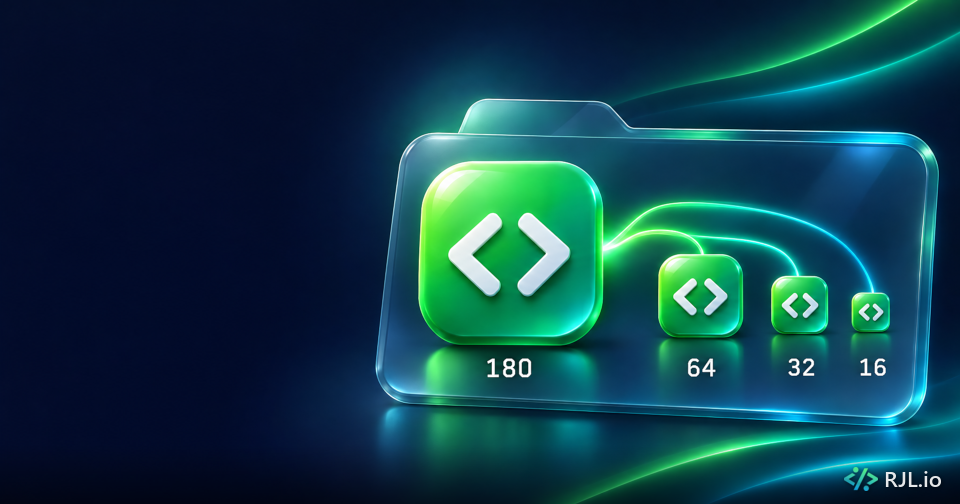
Favicon Generator Tool
Fetch from Website
Paste any website URL. We will find the best available icon (favicon, Apple touch icon, og:image, manifest, SVG) and auto-fill site metadata.
Source Image
Click to upload or drag and drop
PNG, JPG, SVG, WebP, GIF, BMP, ICO, AVIF (recommended: 512x512px or larger)
Text or Emoji
Or press Win + . / Cmd + Ctrl + Space for system picker
128x128
32x32
16x16
Settings
Auto-fills App Name, theme color, and description from this URL's metadata. With Include full PWA support on, it also enables real screenshot capture: desktop and mobile screenshots of your live site are captured for the install prompt (placeholders are used if the capture cannot complete). The icon itself comes from the Source panel above — use the Source > Website URL tab if you want to pull the icon from a site too.
Used by browsers, OS search, and install prompts
Helps search engines catalog your site (e.g., utilities, entertainment, finance)
Enable standalone display, scope, orientation, screenshots, and full PWA installability features. Enter your Live Site URL above to capture real screenshots of your site.
Where favicon files will be hosted (e.g., / or /assets/)
HTML Code
Download Package
Capturing real screenshots of your site... the placeholders below are replaced automatically when they arrive.
Preview Files (click to enlarge)
Checkered background shows transparency. Toggle to preview dark mode appearance.
Platform Coverage
Generating Package
What's Included
favicon.svg
Primary favicon for modern browsers. Scales perfectly to any size, supports dark mode via CSS media queries.
favicon.ico
Multi-size ICO (16, 32, 48px) for legacy browser fallback, PDF embedding, and universal compatibility.
apple-touch-icon.png
180x180 PNG for iOS home screen. Required to prevent iOS from taking an ugly screenshot instead.
Android Chrome Icons
192x192 and 512x512 PNG for Android home screen shortcuts and PWA splash screens.
og-image.png
1200x630 social sharing image for Facebook, LinkedIn, Twitter/X. Shows your icon with app name on branded background.
PWA Screenshots
Desktop (1280x800) and mobile (750x1334) screenshots for PWA install prompts, pre-wired into your manifest with the correct form_factor attributes. Enter your website URL and they are captured from your live site; placeholders built from your icon are used if the capture cannot complete.
Manifest + README
2026 site.webmanifest with id, description, lang, dir, categories, icons and display: "browser". PWA mode adds scope, orientation, screenshots, and shortcuts (display: "standalone"). Plus README.txt with installation guide.
Why RJL.io Favicon Generator?
The most modern, future-proof favicon generator. No tech debt - just clean, minimal output.
| Feature | RJL.io | Others | Feature | RJL.io | Others |
|---|---|---|---|---|---|
| 100% Client-Side (Privacy) | Dark Mode Theme Color | ||||
| SVG Favicon First | 16+ Framework Code Snippets | ||||
| No Legacy File Bloat | Auto-Upgrade from URL (?source=) | ||||
| Free, No Signup | Varies | Apple PWA Meta Tags | |||
| Aspect Ratio Preserved | Works Offline | ||||
| WebP, AVIF, HEIC Input | Limited | README.txt Install Guide | |||
| PWA Manifest Generation | Sometimes | Android Chrome Icons | Sometimes | ||
| ICO from Any Image Format | Limited | Multi-Size ICO (16/32/48) | 32px only | ||
| Create from Text/Emoji | 1,800+ Emoji Picker | ||||
| Transparent Background | Sometimes | Check Existing Favicon | |||
| OG Image (1200x630) | Modern HTML (No Deprecated Tags) | ||||
| Metadata Auto-Fill from URL | Rich Manifest (2026) | ||||
| Real PWA Screenshots from Your URL | Rare | Maskable Icons (Safe-Zone Padded) | Sometimes | ||
| ZIP Download (All Files) | Sometimes | Individual File Downloads |
100% Free, Forever
Other favicon generators charge $5-20 for basic features. We give you everything for free: PWA manifests, OG images, 17 framework snippets, emoji picker, text-to-favicon - no signup, no limits, no catch.
Why? Because developers deserve better tools without paywalls.
Private 100% In Your Browser
Your source image never leaves your device. Every icon, manifest, and code snippet is generated locally in your browser - no image uploads, no tracking. The only thing ever sent to a server is the site URL you type, so your screenshots can be captured. Your images stay yours.
Real Website Screenshots
Enter your website URL with PWA support on and the desktop (1280x800) and mobile (750x1334) screenshots are captured from your live site and dropped into the package automatically. If the capture cannot complete, you still get placeholders built from your icon - the manifest is wired up either way.
The 2026 Standard: Zero Tech Debt
Other generators create tech debt with 15+ obsolete files. We output only what 2026 browsers need: 6 essential files, rich manifests, and PWA screenshots. Clean code, zero bloat.
Already have favicons? Audit your site to see if you have tech debt to clean up.
Pro Tip: URL Parameter for Quick Generation
You can pre-load and auto-generate favicons by adding ?source=IMAGE_URL to the URL. For example: /favicon-generator/?source=https://example.com/logo.png
The Favicon Checker uses this feature to link directly here with your existing icons.
Favicon Files, Sizes and Tags Explained
Which file does each place actually use?
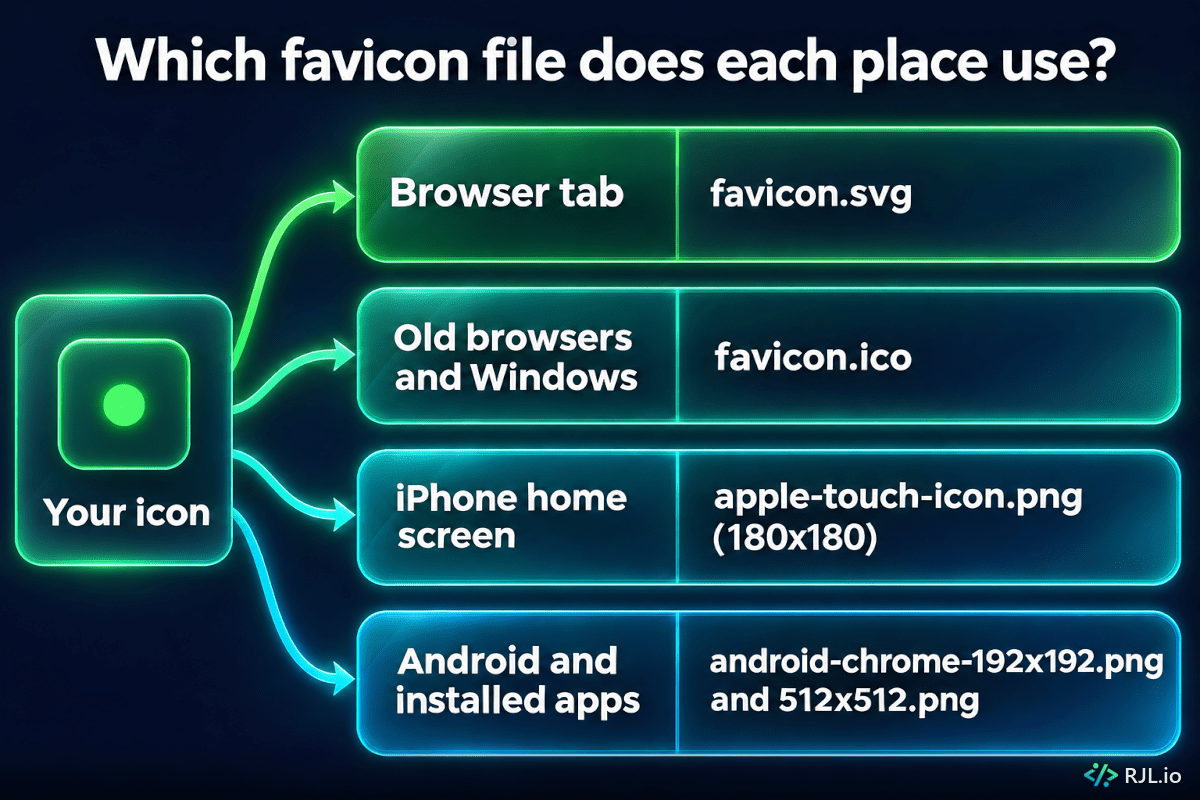
One logo, several files, because every surface asks for a different one. The browser picks from the <link> tags in your <head>; phones read the touch icon and the web manifest; anything that never reads your HTML falls back to /favicon.ico at the site root.
- Browser tab and bookmarks:
favicon.svgin browsers that support SVG icons, otherwisefavicon.ico. - Old browsers, feed readers, tools: they request
/favicon.icowithout reading your HTML, so keep it in the root. - iPhone and iPad home screen:
apple-touch-icon.png, 180x180. Without it iOS shows a page snapshot instead. - Android home screen and installed web apps: the 192x192 and 512x512 PNGs listed in
site.webmanifest. - Google Search results: Google reads your page's icon and wants a square image in multiples of 48 pixels (48x48, 96x96 and so on) or an SVG.
Already have a site? Run it through the Favicon Checker to see which of these are missing.
The head tags, line by line
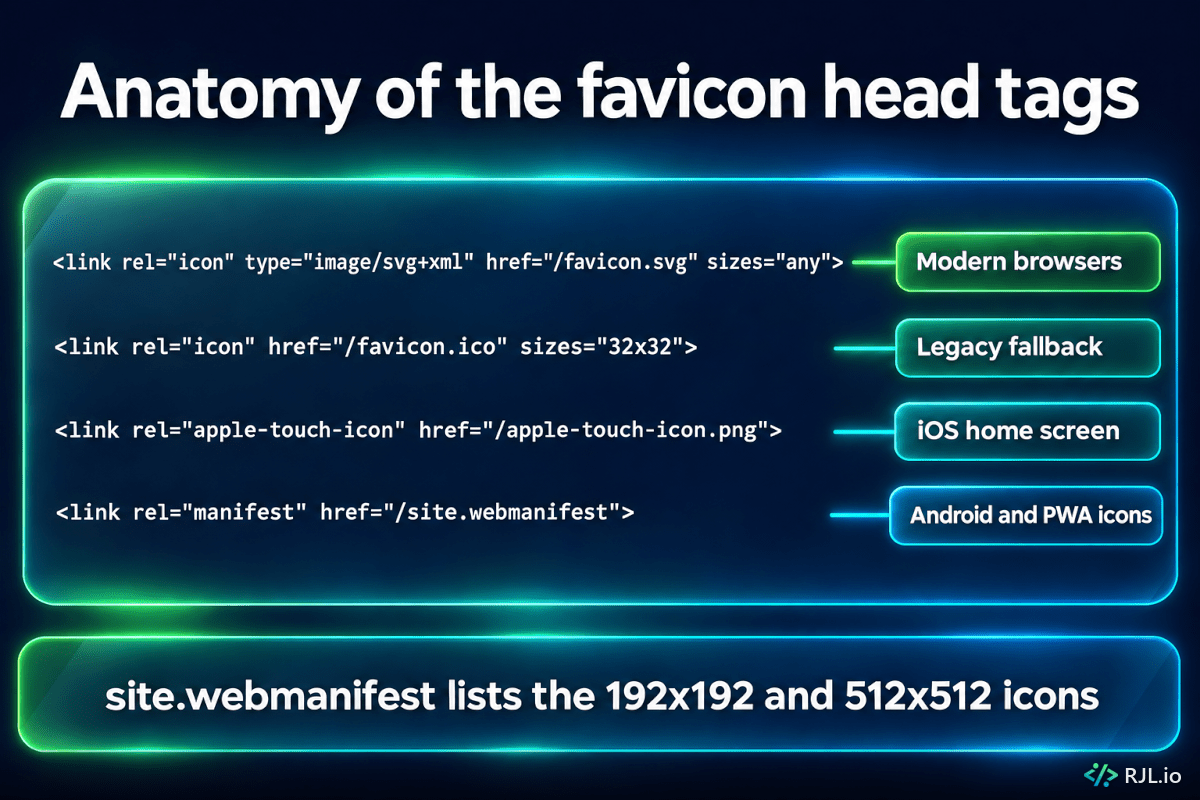
rel="icon" type="image/svg+xml" href="/favicon.svg" sizes="any"
The modern icon.sizes="any"tells the browser the vector scales to any size, and the SVG can restyle itself for dark mode with aprefers-color-schememedia query.rel="icon" href="/favicon.ico" sizes="32x32"
The fallback. One ICO file holds 16, 32 and 48 pixel images. Thesizes="32x32"value stops Chrome from picking the ICO over the SVG.rel="apple-touch-icon" href="/apple-touch-icon.png"
A 180x180 PNG for the iOS home screen. Give it a solid background; iOS fills transparency with black.rel="manifest" href="/site.webmanifest"
Points phones and install prompts at your app name, colors and the 192 and 512 pixel icons.meta name="theme-color"
Colors the browser toolbar on phones. Add a second tag withmedia="(prefers-color-scheme: dark)"for dark mode.
The related social preview tags live in the same <head>; the Meta Tag Generator writes those.
Favicon sizes and formats at a glance
| File | Size | Format | Used for |
|---|---|---|---|
favicon.svg | Any (vector) | SVG | Tabs and bookmarks in modern browsers, dark mode |
favicon.ico | 16, 32 and 48 px in one file | ICO | Legacy browsers, tools that request /favicon.ico |
apple-touch-icon.png | 180 x 180 | PNG | iPhone and iPad home screen |
android-chrome-192x192.png | 192 x 192 | PNG | Android home screen, installed app icon |
android-chrome-512x512.png | 512 x 512 | PNG | Install splash screen, store-style listings |
og-image.png | 1200 x 630 | PNG | Link previews on social networks and chat apps |
screenshot-desktop.png | 1280 x 800 | PNG | Install prompt, form_factor: "wide" |
screenshot-mobile.png | 750 x 1334 | PNG | Install prompt, form_factor: "narrow" |
site.webmanifest | n/a | JSON | App name, colors, icons and display mode |
Use a square source image of at least 512 x 512 pixels. A wide logo is letterboxed, not cropped, so a simple mark or monogram reads better at 16 pixels than a full wordmark. Need to resize first? Try the Image Resizer.
Web manifest entries that matter
A minimal site.webmanifest
{
  "name": "My Website",
  "short_name": "MySite",
  "icons": [
    { "src": "/android-chrome-192x192.png",
      "sizes": "192x192", "type": "image/png" },
    { "src": "/android-chrome-512x512.png",
      "sizes": "512x512", "type": "image/png" }
  ],
  "theme_color": "#ffffff",
  "background_color": "#ffffff",
  "display": "browser"
}name/short_name: the full name and the label that fits under a home screen icon.icons: Chrome needs both the 192 and the 512 pixel PNG before it treats a site as installable.display:browseropens a normal tab;standaloneopens the site like an app with no address bar. The generator writesstandalonein PWA mode.theme_color/background_color: the toolbar color and the splash screen color.screenshots: optional images shown in the install prompt, one withform_factor: "wide"and one with"narrow". PWA mode adds them.purpose: "maskable": optional on an icon. A maskable icon is cropped to a circle or rounded square, so keep the important artwork in the central safe zone.
Want to inspect or hand-edit the manifest? The JSON Tools format and validate it in your browser.
Common favicon mistakes and how to fix them
The old icon still shows
Browsers cache favicons for a long time. Hard-refresh, open the icon URL directly, or close and reopen the tab. Search results update on Google's schedule, not yours.
Black corners on the iPhone icon
iOS fills transparent pixels with black. Start from a source image that has a solid background so the 180x180 touch icon is not transparent.
Paths that break on sub-pages
A relative href="favicon.svg" breaks on /blog/post/. Use root-relative paths that start with a slash, as the generated snippets do.
Blurry or unreadable at 16 pixels
Fine detail disappears. Start from a simple, high-contrast mark with generous padding rather than a full logo with a tagline.
Old tags left in the head
Tags like rel="shortcut icon", the msapplication-* tile tags and <link rel="mask-icon"> are deprecated and add clutter. The generator does not output them; the Favicon Checker flags any it finds.
Wrong MIME type for the SVG
Serve favicon.svg as image/svg+xml and keep the type attribute on the link tag. After uploading, confirm the whole set with the SEO Analyzer.
Keep it handy: Favicon sizes and tags cheat sheet
Every file, size and format, the head tags, the manifest entries and what each platform needs, on one printable page.
Download the Favicon Generator cheat sheet (PDF)Frequently Asked Questions
Why We Built This Favicon Generator
The existing favicon generators are broken. They're stuck in 2015, generating 15+ redundant PNG files, Windows 8 tiles nobody uses, and browserconfig.xml for a platform that's obsolete. Every file they add is technical debt you'll carry for years. Worse, they force you through multi-page wizards riddled with ads, upload your confidential branding to their servers, and some even charge money for basic functionality.
We built something different. Our generator outputs exactly 6 essential files - nothing more. An SVG favicon that scales perfectly and supports dark mode. A multi-size ICO for legacy browsers. Apple Touch Icon for iOS. Android Chrome icons (192/512) for PWAs. A 1200x630 OG image for social sharing. And a rich PWA manifest with desktop and mobile screenshots captured from your live site when you enter your URL (placeholders built from your icon if the capture cannot complete). That's it. No favicon-16x16.png, favicon-32x32.png, favicon-48x48.png bloat - those sizes are already embedded in the ICO file. No mstile-150x150.png that only Windows 8 ever used. No safari-pinned-tab.svg either - Safari 12 (2019) removed pinned-tab support, so mask-icon is dead in every 2026 browser.
100% client-side processing. Your images never leave your browser. We use the Canvas API to generate every icon locally - no image uploads, no privacy concerns, no waiting. Upload a WebP, AVIF, HEIC, or any image format and get your favicon package instantly. Works completely offline after the page loads. The one optional network step is real PWA screenshots: give us your site URL and our capture service visits your public site to photograph it, then the images are swapped into your package - your own files are never sent anywhere.
Modern HTML output with dark mode support. We generate proper theme-color meta tags with media queries for light and dark modes. Apple PWA meta tags for iOS home screen apps. Zero deprecated tags - no mask-icon, no apple-mobile-web-app-capable, no msapplication-* tile config. Ready-to-use code snippets for 16+ frameworks - React, Next.js (App Router and Pages), Vue, Angular, SvelteKit, Rails, Django, ASP.NET, and more. Copy, paste, done.
Like all tools on RJL.io, this favicon generator is free, requires no signup, and works offline. No ads, no paywalls, no multi-step wizards. Just upload your image and download your files. Need other developer tools? Check out our QR Code Generator, JSON Tools, or Color Palette Generator.
Real screenshots are still being captured
Desktop and mobile screenshots of your site are on their way - usually 10 to 30 seconds. Download now and the package ships with placeholder screenshots instead.