Base64 Encoder & Decoder
Text, Files & Images
Encode text, files, and images to Base64 or decode Base64 back to original content. Supports URL-safe encoding, Data URIs, JWT decoding, and file downloads. 100% client-side - your data never leaves your browser.
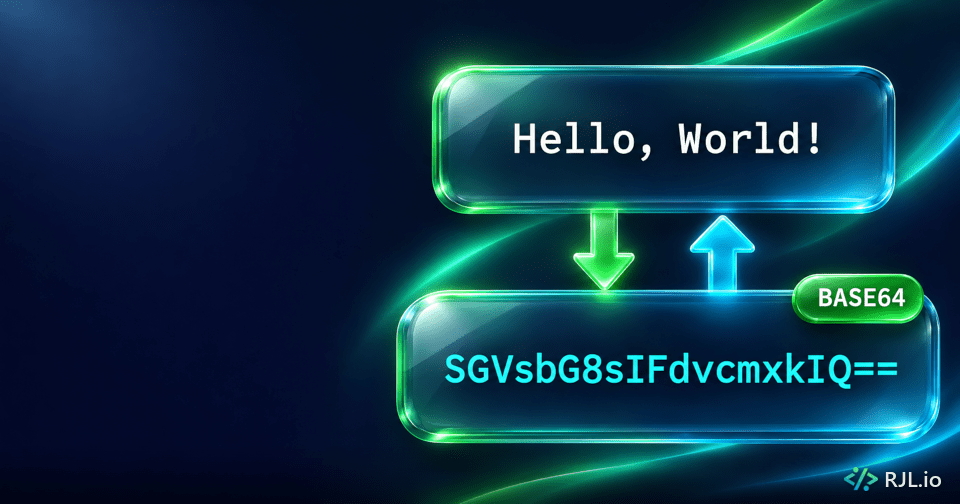
Base64 (RFC 4648 section 4): 3 bytes become 4 characters, about 33% larger.
Input Text
Drag & drop a file here or click to browse
Max file size: 10MB
Drag & drop an image here or click to browse
Supports PNG, JPG, GIF, WebP, SVG
Base64 Output
Header
Payload
Signature
Base64 Quick Reference
What is Base64?
Base64 encodes binary data into ASCII text using 64 characters (A-Z, a-z, 0-9, +, /). It's commonly used for embedding images in CSS/HTML, encoding email attachments, and transmitting binary data over text-based protocols.
Size Overhead
Base64 encoding increases data size by approximately 33%. Every 3 bytes of input becomes 4 characters of output. Consider this when embedding large files or images.
URL-Safe Base64
URL-safe Base64 replaces + with - and / with _, making it safe for URLs, filenames, and query parameters.
Data URIs
Data URIs embed files directly in HTML/CSS using the format: data:[mime-type];base64,[data]. Great for small images to reduce HTTP requests.
JWT Tokens
JSON Web Tokens use URL-safe Base64 to encode the header and payload. The signature is also Base64-encoded. JWTs are widely used for authentication and authorization.
Common Uses
- Embedding images in CSS/HTML
- Email attachments (MIME)
- API data transmission
- Storing binary in JSON/XML
Common Use Cases
Embed Images in CSS
Convert small icons and images to Data URIs for embedding directly in stylesheets, reducing HTTP requests.
Email Attachments
MIME encoding uses Base64 to safely transmit binary attachments through email systems that only support text.
Store Binary in JSON
Encode files, images, or other binary data for storage in JSON, XML, or other text-based formats.
Debug JWT Tokens
Decode JWT tokens to inspect the header, payload, and verify claims during authentication debugging.
API Data Transfer
Safely transmit binary data through REST APIs that expect JSON or XML payloads.
Inline SVG in CSS
Encode SVG files for use as CSS background images without external file dependencies.
Base64 Explained: Encoding, Alphabets, Padding and Size
Everything you need to read, write and debug Base64 by hand, with the same worked examples the encoder above produces.
How Base64 works
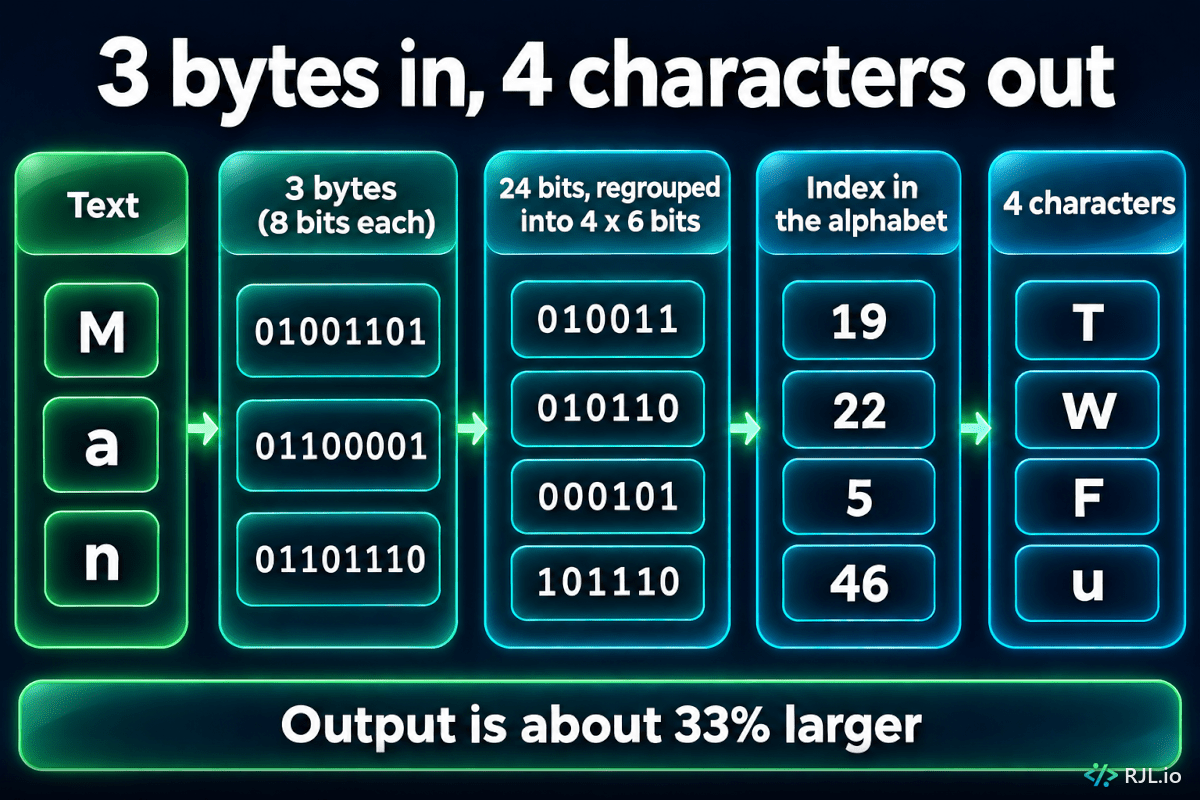
Base64 reads your data three bytes (24 bits) at a time and re-cuts those 24 bits into four groups of 6 bits. Each 6-bit group is a number from 0 to 63, and that number picks one character from a 64-character alphabet. Three bytes in, four characters out.
- Convert the text to bytes (UTF-8 for modern text).
Manis the bytes 77, 97, 110. - Write each byte as 8 bits and join them:
010011010110000101101110. - Split into 6-bit groups: 010011, 010110, 000101, 101110, which are 19, 22, 5 and 46.
- Look each number up in the alphabet (A is 0, Z is 25, a is 26, z is 51, 0 is 52, 9 is 61, + is 62, / is 63): T, W, F, u.
Result: Man becomes TWFu. Try it: encode "Man" in the tool.
Alphabets and padding
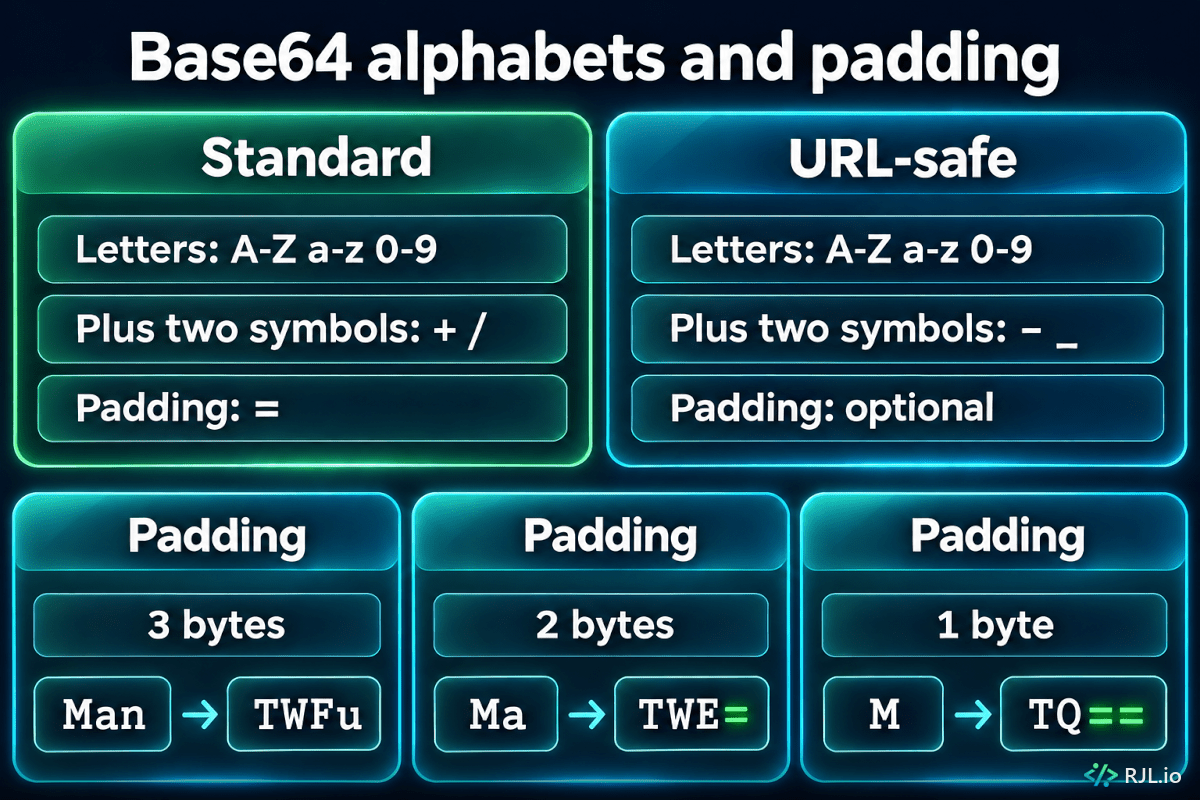
Input lengths that are not a multiple of 3 leave a partial group at the end. Standard Base64 fills the output with = so its length is always a multiple of 4:
- 3 bytes: no padding (
ManisTWFu) - 2 bytes: one
=(MaisTWE=) - 1 byte: two
==(MisTQ==)
The URL-safe variant swaps + and / for - and _ and usually drops the padding, because +, / and = all have special meaning in URLs and filenames. Decoders can restore the padding from the length.
Base64 variants at a glance
| Variant | Characters 62 and 63 | Padding | Line breaks | Typical use |
|---|---|---|---|---|
| Standard (RFC 4648 section 4) | + and / | = required | None | JSON fields, data URIs, general use |
| URL-safe (RFC 4648 section 5) | - and _ | Often omitted | None | URLs, filenames, JWT parts |
| MIME (RFC 2045) | + and / | = required | Every 76 characters | Email attachments |
Size overhead: how big is the Base64 output?
The output length is 4 x ceil(n / 3) characters for n input bytes, so Base64 is about 33% larger than the original. MIME line breaks add one more byte per 76 characters, and a data URI adds a prefix such as data:image/png;base64,.
| Input size | Input bytes | Base64 characters (no line breaks) |
|---|---|---|
| 1 KB | 1,024 | 1,368 |
| 10 KB | 10,240 | 13,656 |
| 100 KB | 102,400 | 136,536 |
| 1 MB | 1,048,576 | 1,398,104 |
Gzip-compressing the page after the fact recovers some of the overhead for text, but not for data that is already compressed, such as PNG or JPEG images.
Hex, Base32 and Base58
The format buttons above the input switch the same tool between four binary-to-text encodings. They trade size for readability and for characters that are easy to type, say aloud or paste into a URL.
| Encoding | Alphabet | Size vs. input | "Hello" becomes | Used for |
|---|---|---|---|---|
| Base64 | 64 characters, = padding | +33% | SGVsbG8= | Email, JSON, data URIs, JWT |
| Hex | 0-9 and a-f | +100% | 48656c6c6f | Hashes, byte dumps, colors |
| Base32 (RFC 4648) | A-Z and 2-7, = padding | +60% | JBSWY3DP | One-time password (TOTP) secrets, case-insensitive systems |
| Base58 (Bitcoin alphabet) | 58 characters, no 0 O I l and no symbols | About +37% | 9Ajdvzr | Cryptocurrency addresses, short IDs people copy by hand |
Base58 treats the whole input as one big number, so it is meant for small values (this tool accepts up to 64 KB), and each leading zero byte is written as a leading 1. Related tools: Hash Generator for hex digests and URL Encoder for percent-encoding.
Common Base64 mistakes and how to fix them
| Mistake | What you see | Fix |
|---|---|---|
| Treating Base64 as encryption | Secrets readable by anyone who pastes them into a decoder | Encrypt first (AES, for example), then Base64 the ciphertext |
| Wrong character encoding | Garbled accents or question marks after decoding | Encode and decode with the same character set. Use UTF-8 unless a system demands otherwise |
| URL-safe string fed to a standard decoder | "Invalid character" for - or _ | Swap - to + and _ to /, then restore padding. This tool does it automatically |
| Missing or stripped padding | Strict decoders reject a length that is not a multiple of 4 | Append = until the length is a multiple of 4 |
| Line breaks or spaces inside the string | Decoding fails after copying from an email or log | Remove whitespace before decoding (MIME wraps at 76 characters) |
| Data URI prefix left in | Garbage output starting with data:image | Strip everything up to and including base64, |
| Encoding twice | Decoded output is itself Base64 (often starting with U0dW or ZXlK) | Decode once more. For JWTs, each of the first two parts decodes to JSON |
Decoded JSON? Paste it into JSON Tools to format and validate it.
Base64 cheat sheet
A printable one-page reference: alphabets, padding rules, size overhead, data URI format and the Hex, Base32 and Base58 variants.
Download the Base64 cheat sheet (PDF)Frequently Asked Questions
Pro Tip: Link directly with ?encode=Hello or ?decode=SGVsbG8= - auto-processes on page load!
Why We Built This Base64 Tool
Developers constantly need to encode and decode Base64 data - embedding images in CSS, debugging JWT tokens, preparing data for APIs, or extracting files from Base64 strings in logs. Most online Base64 tools are basic single-purpose converters that lack the features developers actually need: file handling, image previews, JWT parsing, URL-safe variants, and Data URI generation. We built this comprehensive Base64 encoder/decoder to handle all these use cases in one place.
Unlike other Base64 tools that upload your data to servers, this tool processes everything locally in your browser. Your sensitive data - API keys, authentication tokens, private images, confidential documents - never leaves your device. The tool works completely offline once loaded, making it safe for enterprise environments, air-gapped systems, and any situation where data privacy is critical.
This Base64 tool is part of RJL.io's collection of free developer tools - each designed to do one thing exceptionally well. Working with code formatting? Try our Pretty Print tool. Need to embed SVGs in CSS? Use our SVG URL Encoder. Building QR codes? Check our QR Code Generator. Every tool is 100% client-side, works offline, and respects your privacy.